The structure of the NHS App
The NHS App brings together many different features and services that help people manage their healthcare digitally. In total, there are over 60 services within the app.
Research shows that people use the NHS App with specific tasks in mind, they do not come to the app to explore what they could do. Because of this, and the complexity and sensitivity of healthcare information, the app's structure is critical for usability. A clear structure helps people complete tasks as easily as possible by organising information in ways that reflect how users think about healthcare.
This section explains the overall structure of the NHS App.
Overview
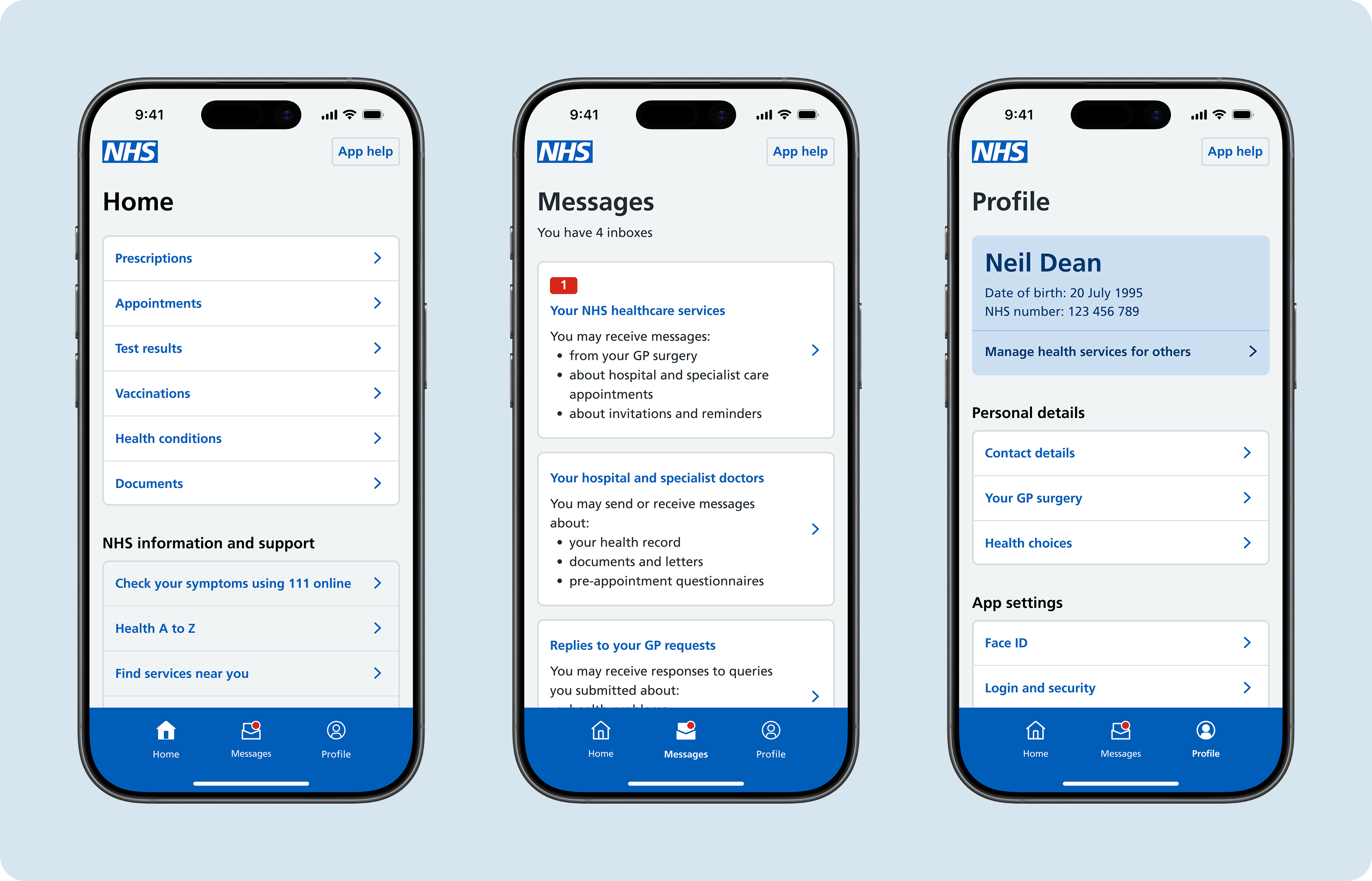
The NHS App has three main areas, called hubs: Home, Messages and Profile. From these hubs, users can access the services and features they need through categories such as prescriptions, appointments and test results—these are called sub-hubs.
Across all parts of the app, the options available to users depend on which information and services their GP surgery or secondary care provider has enabled.
Home
This is where users will start most of their journeys to arrange healthcare or manage their health. From home, users can access core health categories such as prescriptions, appointments and test results. Home acts as the 'main menu' of the app for almost all health journeys.
Home also includes additional NHS information and support, enabling users to access 111 online or to find services near them.
Messages
This is where users can read, and sometimes reply to, messages from their healthcare services. The number and type of inboxes available to them will depend on their GP surgery.
Profile
The purpose of Profile is to display the user's personal information and preferences. Users can view and update their contact and login details (their NHS account), set health preferences such as their GP surgery and organ donation decision, manage services for another person, and change NHS App settings such as notifications, biometric login and cookies preferences.
Research
In designing the NHS App's structure, user testing was performed with over 1000 users and in collaboration with care settings and clinical safety experts. Specific accessibility testing was carried out with people with a wide range of physical, cognitive and complex disabilities.
The current structure of the NHS App is based on research proving that most users were opening the app with a specific task in mind, such as:
- carrying out a health-related transaction, such as ordering a repeat prescription or booking an appointment
- checking information, such as test results or documents
- updating preferences, such as organ donation decision or notifications
The majority of people understood the purpose of each of the three main app areas of Home, Messages and Profile, resulting in more direct navigational success across the core health journeys and helping users find what they need.
The structure of the NHS App is continuously monitored using Adobe Analytics. Regular user testing on potential improvements to the structure and labelling of things in the app is carried out by the Navigation and Onboarding NHS App Team.
Read more about making changes to the structure of the NHS App.