Contact their GP surgery online
Many people can contact their GP, get advice and arrange care using a form or questionnaire in the NHS App.
These services are enabled by GP surgeries and provided through third-party companies. The journeys are generally structured in a similar way, but the design varies widely.
These services are sometimes called online consultation services, but we avoid using this term in the NHS App because reserach shows it can be difficult to understand.
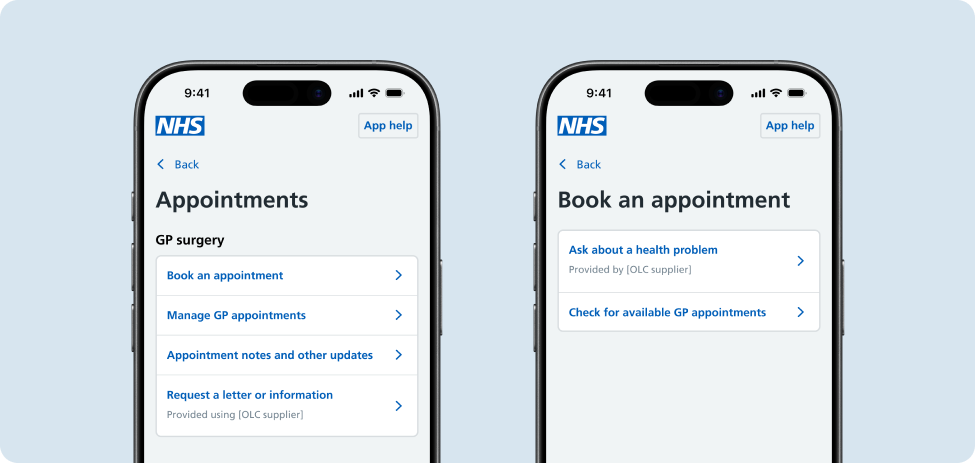
If a user has a health problem
Depending on their GP surgery, there are two ways users could get help with a health problem.
Ask about a health problem
Users can ask their GP about a health problem by navigating to 'Book an appointment' in the appointments sub-hub. This enables users to fill in a form provided by their GP surgery to describe their health problem and receive care and advice. Whilst the triage outcome may not always result in the user booking a GP appointment, research showed using this label increased the direct navigational success for this journey.
'Ask about a health problem' is only available to users whose GP surgery has an integrated online consultation supplier, such as Accurx, eConsult, Engage, PATCHS or Virtually.
Check for available GP appointments
Some GP surgeries make appointments available for users to book directly on the NHS App. Within the 'Book an appointment' section, users can check for available appointment slots for certain appointment types their GP surgery may offer and confirm their booking via a short form.
If a user needs a document or update
Users can request a fit note, a letter from their doctor or other information from the appointments sub-hub by selecting 'Request a letter or information'.
Research showed that the majority of users associated this option with appointments, rather than documents, which is also found on the home screen. The performance of the placement of this option will continue to be monitored through analytics and ongoing user testing.
'Request a letter or information' is only available to users whose GP surgery has an integrated online consultation supplier, such as Accurx, eConsult, Engage, PATCHS or Virtually.
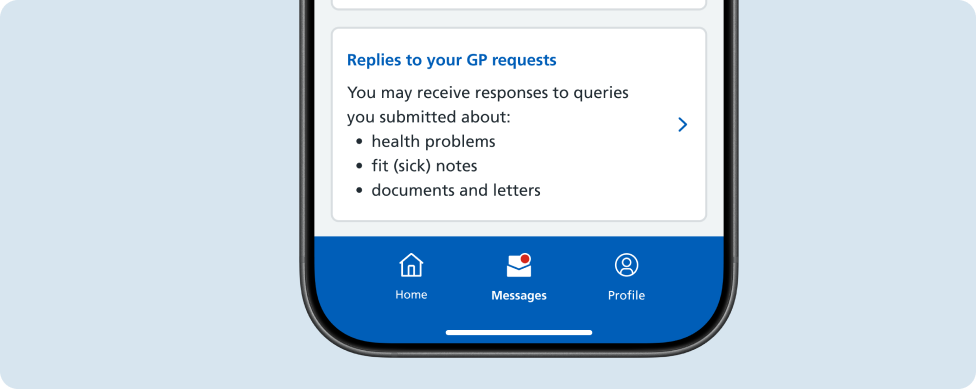
If a user wants to check for a response
Responses to online consultation requests can be found in the 'Messages' hub by selecting 'Replies to your GP requests'. Research showed that users expected responses to come through to them as messages.
Users can access this journey if their GP surgery is served by Engage, PATCHS or Virtually.
Help improve this pattern
The NHS App design system team would like to hear:
- how you have used this pattern in your service
- any feedback you have about its usage, for example accessibility or ideas for improvement
Add these comments to the 'Contact their GP surgery online' discussion on GitHub.