Sub-hubs
Sub-hubs are the second layer of menu screens in the NHS App. They are positioned one level down from hubs.
Sub-hubs group closely related series of links. They reveal information to users in a way that lets them decide where to go next, without being overwhelmed by too many options or distracted by irrelevant options on hubs.
Sub-hub structure
Sub-hubs have a relatively consistent structure to establish rhythm and familiarity as users navigate the NHS App.
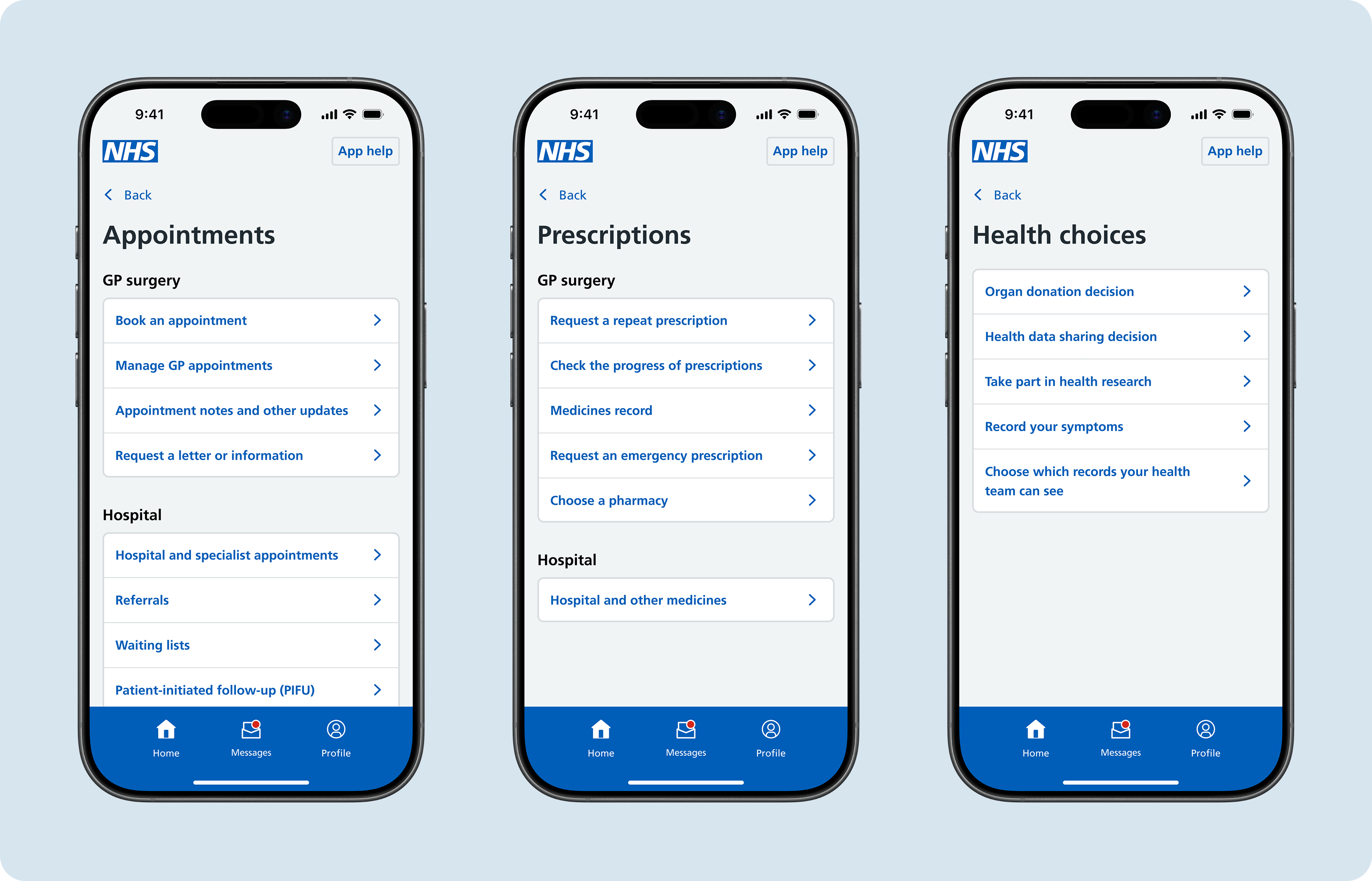
Back button
The back button on a sub-hub takes the user back to the relevant hub.
Main heading
The main heading should describe the type of information grouped within the sub-hub. It should match the label on the preceding card link. Some sub-hub main headings may be supported by a short description to provide more information to the user.
Sub-headings
Sub-headings provide additional structure to sub-hubs by creating meaningful groups of card links which help with navigation. In the prescriptions, appointments, test results and documents sub-hubs, two sub-headings are consistently used:
- GP surgery – options relating to primary care
- Hospital – options relating to secondary care
Research showed that users' mental models of their health information and tasks relating to healthcare are often organised by care setting or type. Structuring the sub-hubs to reflect this helps users find what they are looking for. Sometime, due to the way data is shared between GP surgeries and hospitals, certain health information can blend between the two. This is an aspect of the experience we are monitoring to ensure users can always find what they need.
Sub-headings should also be used if a sub-hub has more than 5 card links. Research shows that users can be overwhelmed by long lists of card links, which clear sub-sections can alleviate.
Card links
Card links on sub-hubs can take users to deeper layers of menu screens or the start of services and other journeys. Some card link labels in sub-hubs or deeper menu screens may be supported by a short description, if a user need for one has been uncovered.
Sub-hubs in the app
There are currently 8 sub-hubs in the NHS App:
- Prescriptions
- Appointments
- Test results
- Vaccinations
- Health conditions
- Documents
- Manage health services for others (proxy access)
- Health choices
Some sub-hubs, such as test-results and health conditions, will present differently to users depending on their GP surgery's IT supplier. For example some users will see Allergoes and adverse reactions as a sub-hub they can access from the home screen in place of the Health conditions sub-hub.
Research
In our research, people were able to use sub-hubs to complete tasks and they understood where they were in the app. Some users were not aware that they could scroll to view the bottom of the sub-hubs. However, this may have been influenced by our testing with a prototype rather than users' own devices.