Making changes to the structure of the NHS App
Sometimes changes need to be made to the structure of the NHS App. This usually happens when:
- a new journey or service needs to be added, positioned and labelled
- user research shows that people are struggling to navigate to an existing part of the app, for example because of its position or label.
This section explains how teams should work with the Navigation and Onboarding team to propose changes to the app's structure. It also outlines research approaches and other factors to consider when proposing changes.
Understanding the existing structure
While the structure of the NHS App can evolve, it is a complex and carefully balanced organisation of health information. Many of the journeys within the NHS App are interlinked. Changes to the structure, even if they seem small, can have a significant impact on other parts of the app.
Research shows that users view and experience the NHS App as a singular thing, when in fact it is a combination of many different services and data. It is essential for NHS App teams to ensure consistency in the experience, from the overall structure down to labels and data read outs to meet user's mental models.
For more context, see the page on the structure of the NHS App.
When proposing changes, you should consider:
- the need for the change
- whether your service could be integrated into an existing service
- how the journey may fit alongside others in the same location
- how its positioning may impact the other journeys on the page
- relevant existing research
- the content and design of the link or entry point
The Navigation and Onboarding team
The Navigation and Onboarding team is responsible for the overall structure of the NHS App. They have expertise in:
- how and why health information is currently organised within the app
- how people navigate and interact with the app in general
- existing research into the app's structure
- how to best label services in the app context
- past, current and planned services and features
Before you start researching or designing changes to the app's structure, you should contact the Navigation and Onboarding team and introduce them to your proposed change. You should continue to involve them throughout your design process to help make your work more efficient. They can help you:
- define the navigational problem you are trying to solve
- share relevant existing research
- plan suitable user research and set clear objectives
- design feasible solutions
- understand how changes are delivered
Involving the Navigation and Onboarding team early and throughout the process helps ensure changes follow best practice and can be delivered smoothly. Final say on any changes to the structure of the NHS App lies with the Navigation and Onboarding team.
Researching and measuring information architecture changes
Changes to the structure of the NHS App affect how people find and understand multiple services. Because of this, information architecture changes should be evaluated using a range of relevant research methods and consider other parts of the app that may be affected by the change.
Relying on minimal research, or on a single type of research, can give an incomplete picture. A mixed methodology research approach helps teams understand both how people behave at scale and why they behave in that way when navigating the NHS App.
Use a mix of relevant research methods with clear objectives
When researching changes to the app's structure, teams should consider using both qualitative and quantitative methods.
- Quantitative research can help measure whether people are able to find and access services at scale, and whether a change improves or degrades navigation across the app. Examples include tree testing, card sorting, unmoderated usability testing, analytics and feedback gathered through surveys or reviews
- Qualitative research can help explore how people interpret labels, categories and navigation options, and where confusion or uncertainty occurs. Examples include moderated usability testing and 'pop-up', in-person or community research.
To avoid duplication of research efforts, its best practice to review any existing research relevant to the part of the app where you are proposing a change. Your research objectives and hypotheses should be clear and logical to ensure your research efforts are valid.
NHS App Lead User Researchers and the Navigation and Onboarding team can help direct you to existing relevant research, and help you to choose and plan appropriate primary user research.
Define what success looks like
Before starting research, teams should be clear about what a successful change would look like. This should include:
- the primary journey you are trying to add or improve
- the impact on related existing and prospective journeys
- whether the change introduces confusion or makes other tasks harder
Navigational improvements to one journey should be balanced with their impact on the wider app. Changes that help one task but make others harder to find will need further consideration.
The Navigation and Onboarding team can help teams set realistic success measures and interpret results in the context of the wider app.
Interpreting results in context
What counts as a "good" result from a navigational perspective will vary depending on factors such as:
- the complexity of the service or journey and how it fits in with others
- the size and diversity of the user base
- service factors separate to the NHS App
- the type and sensitivity of the information involved
These factors should be taken into account when setting research objectives such as task success rates. A complex or niche service with a small user base can be more difficult for users to understand and locate in the NHS App than more common, larger services such as prescriptions or appointments due to the context, user need and comprehsion of the service. This is often acceptable and sometimes unavoidable.
Other things to consider
Users at different GP surgeries
Some NHS App journeys are only available to users at certain GP surgeries.
Even when this is not the case, you need to consider how a new journey would sit alongside different variations of GP services available to users.
P5 and P9 users
People use their NHS login account to access the NHS App. There are different identity proofing levels associated with NHS login. These range from low (P5) to high (P9) depending on how much proof someone has provided about their identity.
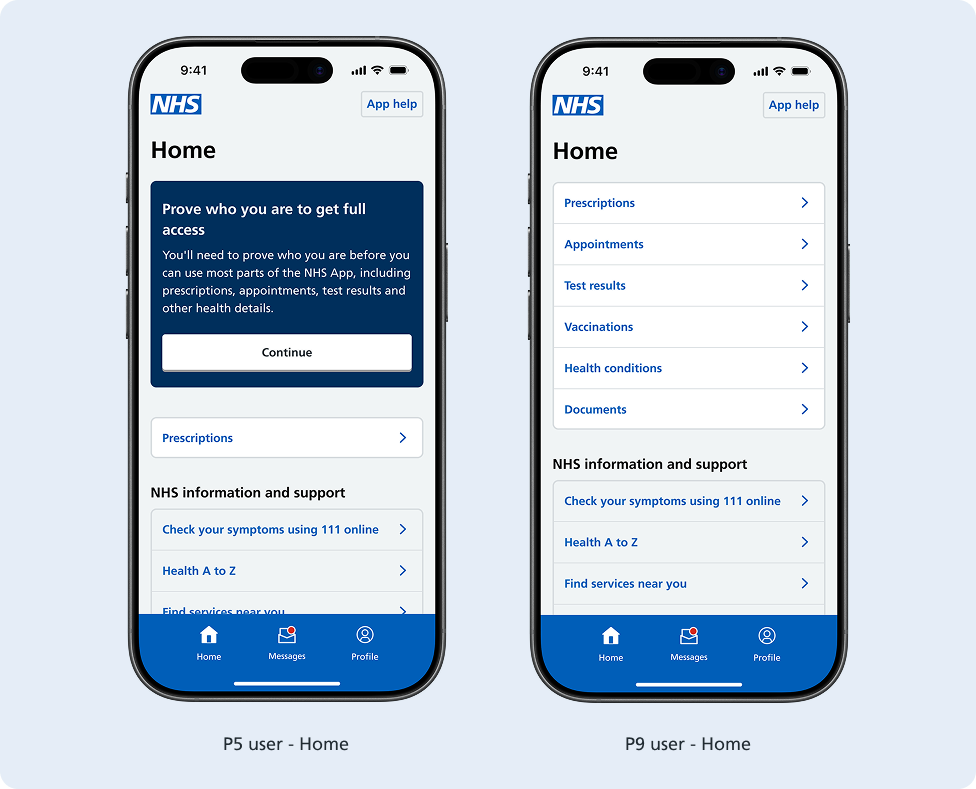
P5 users can access a limited amount of functionality within the NHS App. To gain full access, they will need to prove who they are. They can do this by submitting photo ID or GP surgery registration details.
P9 users have proven their identity and have access to all parts of the NHS App.
Proxy access
If granted, proxy access allows users to switch profiles to manage health services for others in the NHS App. If proxy access has been granted users can switch profiles in the NHS App to help another person manage their health. This may be a child, relative or partner.
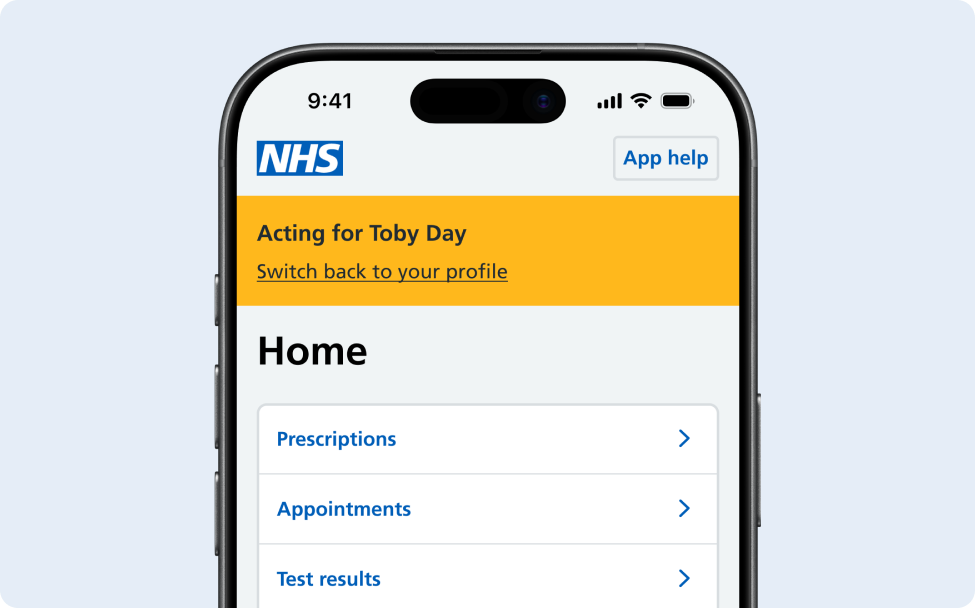
There are only a limited number of journeys available when you act as a proxy user depending on the access level you require or have been granted by your GP surgery. This may include viewing health records, booking appointments and requesting repeat prescriptions.